

The Background Check: A simple way to improve your portraits before you shoot

There is a small moment before every portrait that is easy to rush. The subject is ready, the light looks good, and the settings are close enough.
But before you press the shutter, it is worth asking one simple question: what is happening behind them?
Backgrounds are often the quiet reason a portrait works, or doesn’t. A bright object near the edge of the frame, a line cutting through someone’s head, a messy corner, or a colour that fights with the clothing can all pull attention away from the person you are photographing.
You do not need a large studio to fix most of these problems. A cleaner angle, a little more distance, a tighter crop, or a controlled background can make a portrait feel stronger before editing begins.
Scan the frame before you shoot
When photographing people, it is natural to focus on expression, pose and eye contact. They matter, of course, but the rest of the frame matters too.
Before each setup, take a quick test frame and actually look at it. Check the edges, the space around the head and shoulders, and anything bright or sharp behind the subject. Doorframes, power points, furniture, picture frames and small patches of sunlight can all become more distracting in a finished portrait than they seemed in the room.
This does not mean every portrait needs a blank wall. It simply means the background should feel intentional. In a home studio, spare room or temporary setup, reliable portrait backdrops can help when the room itself is not helping.

Let the background support the subject
A good background should support the subject, not compete with them. For headshots and classic studio work, quiet tones are often the safest choice. Grey, cream, beige, taupe and soft brown tend to sit back in the frame and work with many clothing choices.
Choose the background for the person in front of you. If the subject is wearing bold colours or busy patterns, keep the background simple. If the clothing is plain, a little texture or tonal variation can stop the image from feeling flat. For more dramatic portraits, darker backgrounds can add depth, especially with directional light.
Choose colour for the mood
Colour changes the feeling of a portrait quickly. Cream can feel soft and fresh. Warm neutrals can feel calm and natural. Deep brown, charcoal or black can make the same subject feel more serious, classic or editorial.
This is why a simple solid colour backdrop is useful. It does not lock the image into one theme, and it can be reused across sessions with small changes in lighting, wardrobe, crop and camera height.
It is also worth watching colour spill. In a small room, strong background colours can reflect onto the skin, especially if the subject is close to the backdrop or the light is bouncing around white walls. If skin tones look strange, move the subject forward, flag reflected light, or choose a more muted background.

Add texture without overdoing it
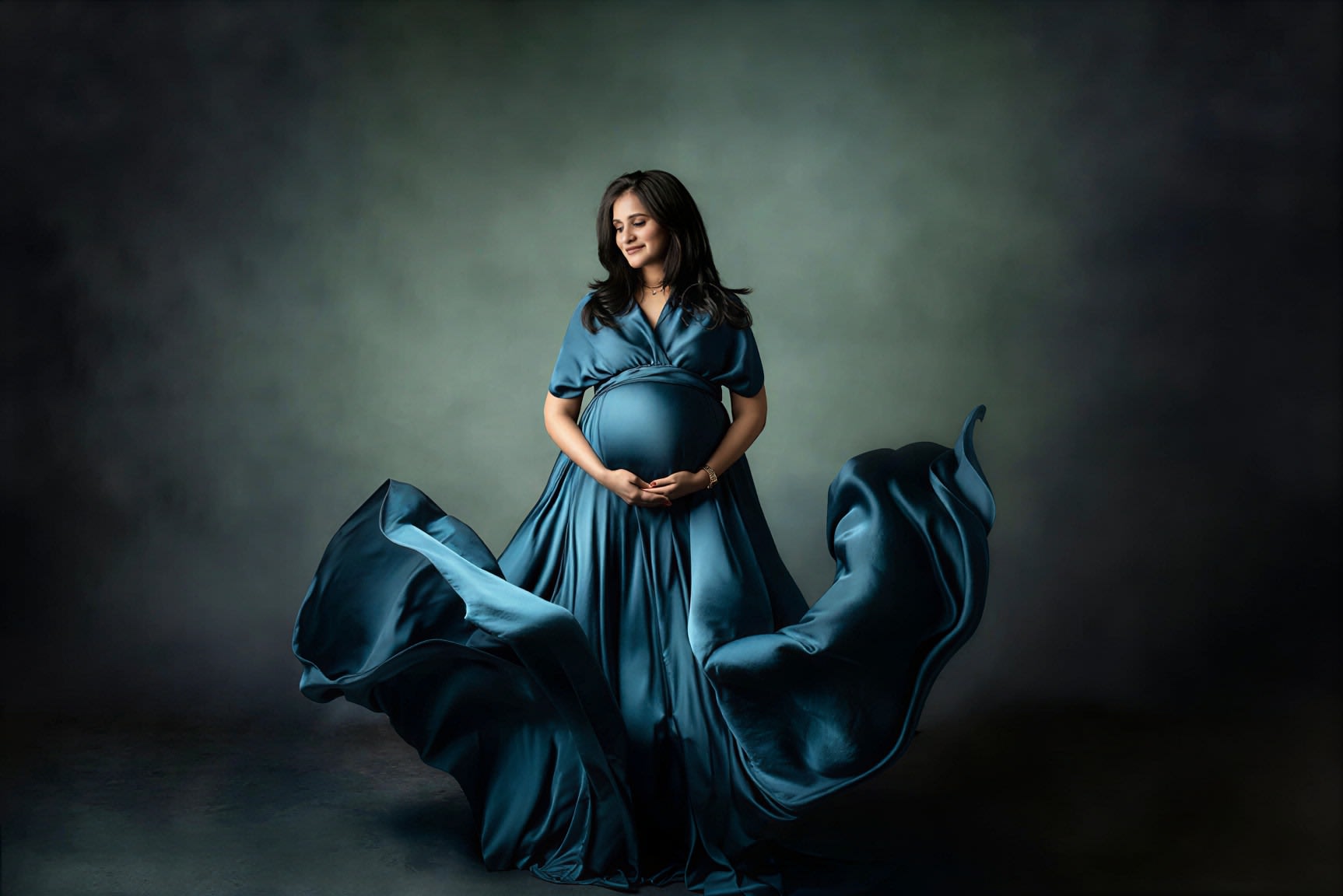
Texture can give a portrait depth, but it should be handled with restraint. A subtle painted surface, mottled finish or fine art style background can stop the image from feeling too clinical. Too much detail, however, can drag the viewer’s eye away from the face.
If you are using a textured background, give the subject some space from it. Even a metre or two can soften the texture, reduce hard shadows and make the frame feel less crowded. A slightly longer focal length can also help simplify what is behind the subject.
Lighting changes how texture behaves. Side light will reveal more detail. Soft front light will calm it down. If the texture is becoming the loudest part of the image, move the subject forward, open the aperture, or reduce the light hitting the background.
Give the subject room to breathe
One common problem in small portrait setups is placing the subject too close to the background. It saves space, but it can flatten the image and create heavy shadows behind the head and shoulders.
When possible, bring the subject forward. That simple move gives the portrait more depth and helps the person stand apart from the background. It also gives you more control over how bright, dark or detailed the background appears.
Separation is not only about shallow depth of field. It is about giving the light room to fall properly. If space is tight, try changing your angle instead of placing the subject flat against the backdrop. A small turn of the body, a step forward, or a tighter crop can often remove distractions without rebuilding the setup.
Build a setup you can repeat
Not every portrait needs a full studio. Many strong images are made with a window, one light, a stool, a clean background and a little working space.
If you regularly shoot headshots, family portraits, content sessions or seasonal minis, a repeatable setup saves time. You know where the subject should stand, how far they should be from the background, which lens works in the room and how the light behaves.
For photographers working in temporary spaces, a simple fabric backdrop or portable backdrop stand can be practical because it can be set up, changed and packed away without taking over the room.

Final thoughts
A better portrait is not always the result of adding more gear. Quite often, it comes from removing distractions.
Before your next session, slow down and do a background check. Watch the edges, check the colour, give the subject space and keep texture under control. The background may not be the star, but when it works well, the person becomes much easier to see.